www.6dofsim.org
six degrees of freedom simulator
[ home ]
[ input ]
[ concept ]
system design
[ mech design ]
[ hw design ]
[ sw design ]
[ integration ]
[ improvements ]
[ tools ]
[ links ]
[ contact ]
vision
[ actors ]
[ cockpit ]
[ xxx ]
[ xxx ]
[ xxx ]
[ xxx ]
[ xxx ]
[ xxx ]
[ xxx ]
[ xxx ]
[ xxx ]
Vision
One topic of the vision is the capability of the system to get 20 beamers driven. This aspect is splitted to some domains:
- Is the simulation able to extract 20 views out of the data base?
- Can the PC drive this 20 beamers?
- in terms of graphic card calculation power?
- in terms of number of graphic ports?
- and in terms of electrical power comsumption of these necessary graphic cards?
Regardless how the final solution will be setup up (beamer or monitors), a primarily setup with monitors is sufficient
to get some experience regarding a multi-graphic-output PC-system.
The actual target is to get a multi-monitor-setup alive like drawn below:
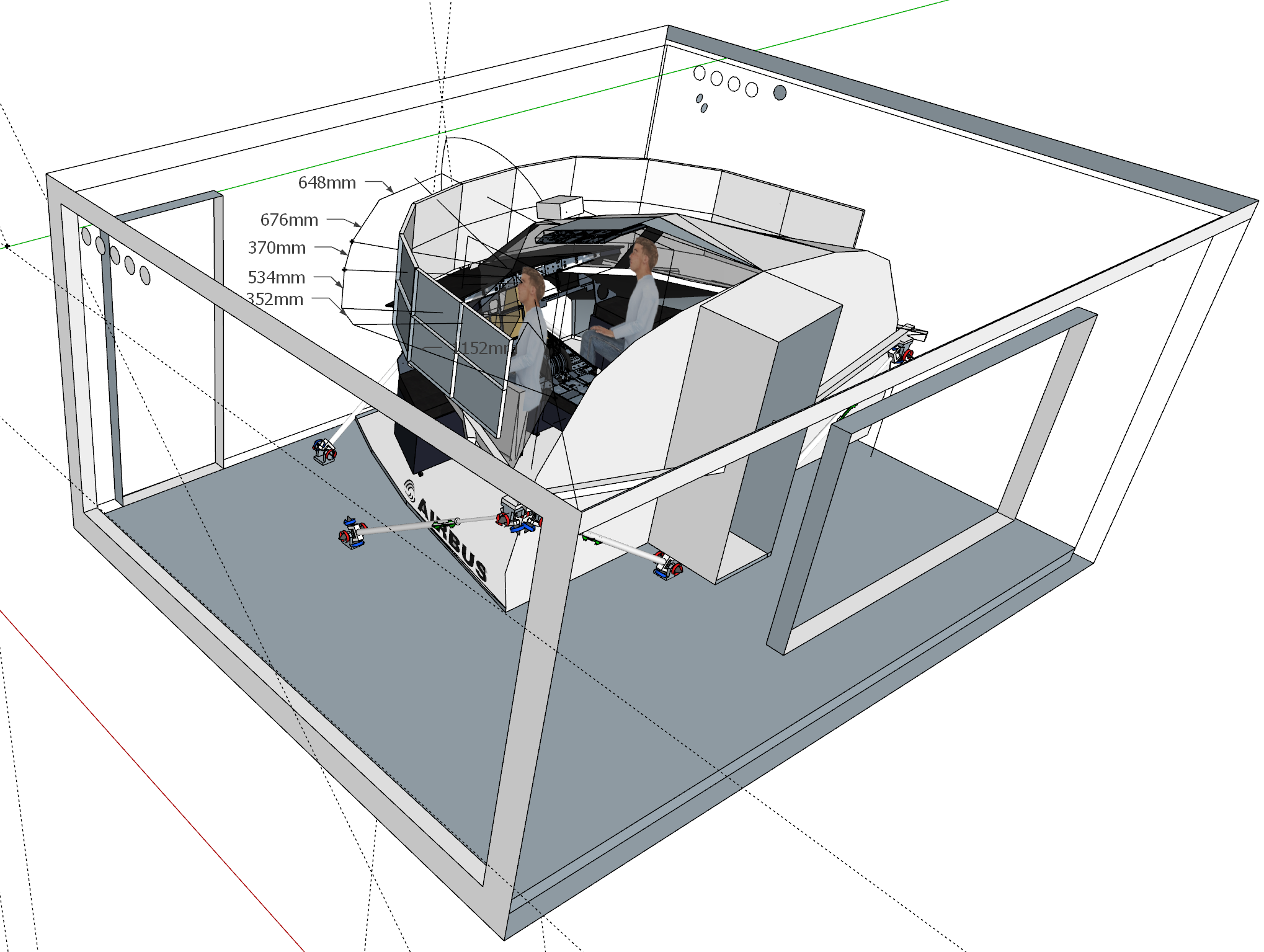
As my actual PC mainboard (ASUS Z170 Pro Gaming) is stuffed only with 3x 16PCIe (in addition with 3x 1PCIe), which
is too less for e.g. 5 graphics cards (sufficient for 20 monitors), I opted for cascaded monitors.
Cascaded monitors driven by one graphics card
According the DP-standard several cascading levels are possible.
According the calculation power and resulting resolution of my Nvidia 1660 Super, the following architecture should had been possible:
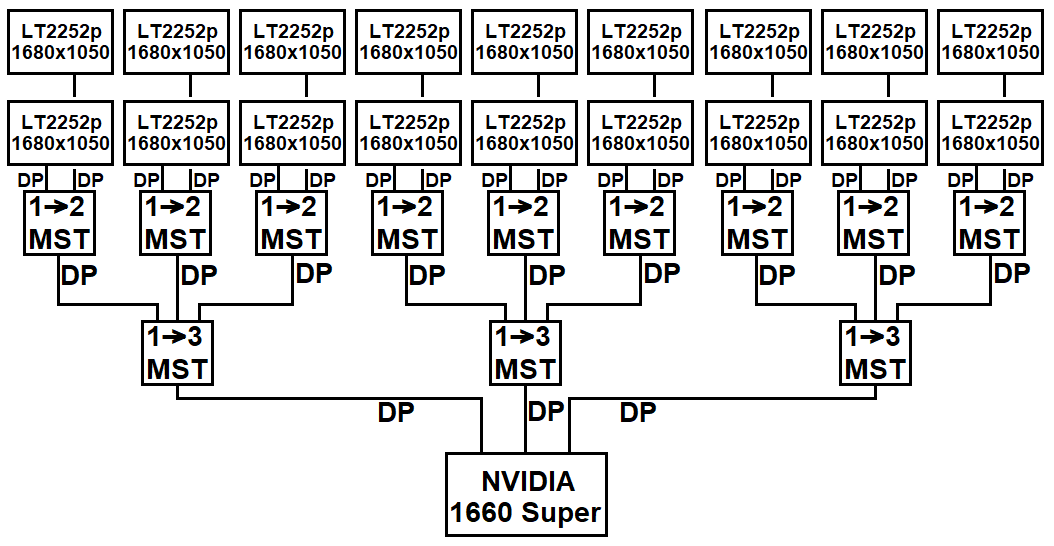
Thats why I tried the following (costs optimized) setup prior to a order of a bunch of MSTs:

All 6 monitors were identified by Win10, but only 4 of them could be set to the status 'active'. Finally I got the information
from NVIDIA Customer Care,
that the GeForce-Cards only support 4 screens / Quadro Series graphics cards would support max 16. Additionally mentioned,
that they do not recommend to use MSTs anyway.
The idea of a single graphic card was stopped.
Multi graphic card check
Next step / test was to check, if / with how many graphics cards Win10 can cope. Available cards were:
- Gigabyte NVIDIA GeForce GTX 1660 Super Gaming 6G OC (16PCIe / 1x HMDI, 3x DP / 2-Slot)
- Gainward NVIDIA GeForce GTX 1050 2GB (16PCIe / HDMI, DP, DVI / 2-Slot)
- ASUS NVIDIA GeForce GT 710 2GB (1PCIe / 4x HDMI / 1-Slot)
- Radeon X800 Pro 256 MB (16PCIe / VGA, S-Video, DVI / 1-Slot)
- Mainboard onboard intel HD Graphics 530 (HDMI, DVI, DP, VGA)
1st try was to place the graphics cards in the PCIe-slots as shown belown. The 1660 Super was set to the PCIEX16_1 as described in the mainboard-manual and the 1050 as 2nd graphics card as described in the PCIEX16_2. The remaining PCIEX1_1 with a 710, the PCIEX1_2 was blocked by the dual slot 1050 and in the PCIEX1_3 with the X800. Power up worked, but the graphics card drivers were not installed properly.
After this experience, I disassembled the graphics cards from the main board and implemented them piece by piece. After getting aware, that the X800 is not supported by WIN10, it turned out, that having the PCIEX16_1 and _2 populated with the 1660 super and 1050, the PCIEX16_3 should be kept free. As the PCIEXT16 are actually only 8x, it may be the fact, that the two PCIEX16-slots are cummulated to a 16x lane, so both 8x slots fully used (by a 16x card each), no further bus capacity would remain for the 3rd PCIEX16-slot?!
As the 3rd PCIEX16 was in fact not available, and the PCIEX1_2 blocked by the 1050 I tried a "PCIe Hub" to gain accessable PCIe-slots, in fact of 16x type. With this arrangement and another 710 I had been able to check out to test if the main board and WIN10 can cope with 5 cards, 4 monitors each: 1 internal card , the 1660 super, 1050 and 2x 710. It worked fine and gave me the confidence to buy another 710 as the 710 supports four screens, the 1050 only three. Having in mind to install the cards properly by using only mainboard sockets 20 monitors only could be achieved by the 1660 super and 3x 710 single slot type cards in the PCIEX1-slots each.
Finally, that worked.
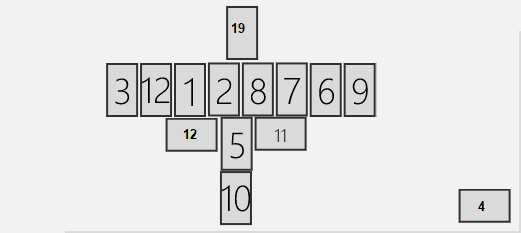
All monitors were detected and could be arranged to a big desktop:
Note: All monitors are the same type except #4 monitor which is my regular PC-screen, actually a small 4k TV that shall
serve as the operator-station,
and #19, which is another "old" TV that shall serve as the overhead-panel for this performance test.
Test was performed with some youtube-videos, pulled over different & all monitors, worked fine.
Next step is to perform a test with full setup:
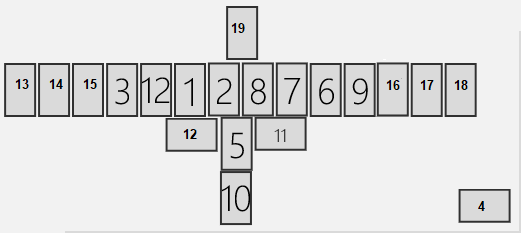
Meanwhile I bought another ASUS NVIDIA GeForce GT 710 2GB (1PCIe / 4x HDMI / 1-Slot) as I experienced, that these
2GB graphics cards have quite a sufficient graphics performance with respect to
"test-needs" (...faaaar better than 1995-experiences) having the focus in mind
to get the "overall - system" demonstrated and running. Additional cables are ordered, so ... this test will take
place in the next time.
Power consumption / voltage stability of the PC-system / the graphic cards is not yet analyzed, as the power
supply of my PC is a 1000W-type, which should cope the needs of the actual configuration.
vision
[ actors ]
[ cockpit ]
[ xxx ]
[ xxx ]
[ xxx ]
[ xxx ]
[ xxx ]
[ xxx ]
[ xxx ]
[ xxx ]
[ xxx ]
[ home ]
[ input ]
[ concept ]
system design
[ mech design ]
[ hw design ]
[ sw design ]
[ integration ]
[ improvements ]
[ tools ]
[ links ]
[ contact ]
change log